> For the complete documentation index, see [llms.txt](https://docs.helmut.de/helmut4-releases/llms.txt). Markdown versions of documentation pages are available by appending `.md` to page URLs; this page is available as [Markdown](https://docs.helmut.de/helmut4-releases/helmut4-components/streamdesigner/nodes/actions/cosmo-16/cosmo-sequence-report-action.md).
# Cosmo Sequence Report Action
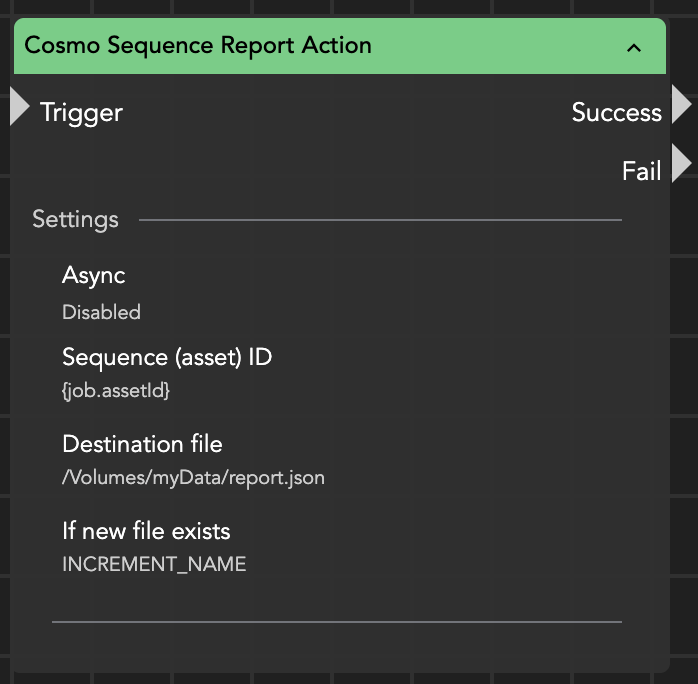
The **Cosmo Sequence Report Action** node exports a JSON report listing all assets used within a sequence.
This node requires that the corresponding project has previously been indexed using **Advanced Indexing** in the [Cosmo Project File Index Action](/helmut4-releases/helmut4-components/streamdesigner/nodes/actions/cosmo-16/cosmo-project-file-index-action.md). Without advanced indexing, the detailed timeline information needed for the report is not available and the node will fail.
#### Input Parameters
**Sequence (Asset) ID**\
ID of the sequence for which the report should be generated.\
Typically retrieved from [{job.assetId}](/helmut4-releases/helmut4-components/streamdesigner/wildcards/job-related-wildcards-32/job-assetid.md) (for example after using **Cosmo Get Project Sequences Action**).
**Destination File**\
Full path and filename of the JSON report.
**If New File Exists**\
Defines how an existing file is handled:
* **APPEND** — adds new data to the existing file
* **INCREMENT\_NAME** — creates a new file with an incremented filename
* **DELETE\_EXISTING** — overwrites the existing file
Cosmo Sequence Report Action
#### Output
The node creates a JSON report containing all media references used in the sequence.
General information included:
* sequence name
* project name
* sequence asset ID
Detailed media reference information:
* referenced assets
* in/out timecodes of the clip
* in/out timecodes within the sequence
* track number
* video frame reference (video assets)
* audio sample reference (audio assets)
The output, for example when writing the node result to a log file, will appear similar to the following example:
```json
{
"sequenceName": "TestSeq",
"assetId": "6315ed32d6347d0001a30ced",
"projectName": "Test project",
"numberOfAssetsUsed": 2,
"filePath": "/Volumes/Helmut/Projects/Premiere Pro/Test project.prproj:::/TestSeq",
"reportItems": [
{
"assetName": "Asset.mp4",
"assetId": "6315d6f5d6347d0001a30ce7",
"filePath": "/Users/editor/files/test-beep.mp4",
"sequenceReferenceList": [
{
"sequenceUUID": "58b1794b-1e75-42be-9d75-58df62d083e8",
"sequenceName": "TestSeq",
"mediaReferences": [
{
"mediaInOutPoint": {
"secondsInPoint": 0.0,
"timeCodeInPoint": "00:00:00:00:25.0/1",
"secondsOutPoint": 16.4164,
"timeCodeOutPoint": "00:00:16:10:25.0/1",
"fps": 25.0
},
"sequenceInOutPoint": {
"secondsInPoint": 0.0,
"timeCodeInPoint": "00:00:00:00:29.97002997002997/1",
"secondsOutPoint": 16.4164,
"timeCodeOutPoint": "00:00:16:12:29.97002997002997/1",
"fps": 29.97002997002997
},
"trackNumber": 1,
"trackType": "VIDEO"
},
{
"mediaInOutPoint": {
"secondsInPoint": 0.0,
"timeCodeInPoint": "00:00:00:00:44100/1",
"secondsOutPoint": 16.583233333333332,
"timeCodeOutPoint": "00:00:16:25720:44100/1",
"fps": 44100.0
},
"sequenceInOutPoint": {
"secondsInPoint": 0.0,
"timeCodeInPoint": "00:00:00:00:48000/1",
"secondsOutPoint": 16.583233333333332,
"timeCodeOutPoint": "00:00:16:27995:48000/1",
"fps": 48000.0
},
"trackNumber": 1,
"trackType": "AUDIO"
}
]
}
```
#### Behavior
* Reads sequence timeline data from the Cosmo database
* Requires prior advanced indexing of the project
* Can be used iteratively with **Cosmo Get Project Sequences Action**
* Supports asynchronous execution
If the sequence ID is invalid or the project was not indexed in advanced mode, the node fails.
#### Typical Workflow
1. Run **Cosmo Project File Index Action** with *Advanced Indexing* enabled
2. Iterate sequences using **Cosmo Get Project Sequences Action**
3. Execute this node for each sequence
4. Export a per-sequence usage report
#### Practical Use Cases
* compliance documentation
* broadcast delivery validation
* timeline analysis
* rights and usage verification
* reconstruction of edit decisions
In practical terms:\
This node answers the question **“What exactly is inside this timeline?”** — not just which clips exist in the project, but precisely where and how they are used in the edit.