> For the complete documentation index, see [llms.txt](https://docs.helmut.de/helmut4-releases/llms.txt). Markdown versions of documentation pages are available by appending `.md` to page URLs; this page is available as [Markdown](https://docs.helmut.de/helmut4-releases/v4.10.1/helmut4-components/helmutfx/preferences/modules/active-directory-auto-module.md).
# Active Directory Auto Module
The Active Directory Auto Module allows to connect to an Active Directory and synchronise groups including subgroups with existing groups Helmut.
This modules offers more flexibility (sync-triggering via [HK](/helmut4-releases/v4.10.1/helmut4-components/helmuthk.md)/ [Cron](/helmut4-releases/v4.10.1/helmut4-components/helmuthk/cron.md) Job) and advanced user/access permissions compared to the older and more basic [ActiveDirectory Module](/helmut4-releases/v4.10.1/helmut4-components/helmutfx/preferences/modules/activedirectory-module.md).
### Limitations
{% hint style="warning" %}
* The Active Directory Auto Module supports only a single AD.
* Azure AD is not supported.
* Multi-forest ADs and global catalogs are not supported.
{% endhint %}
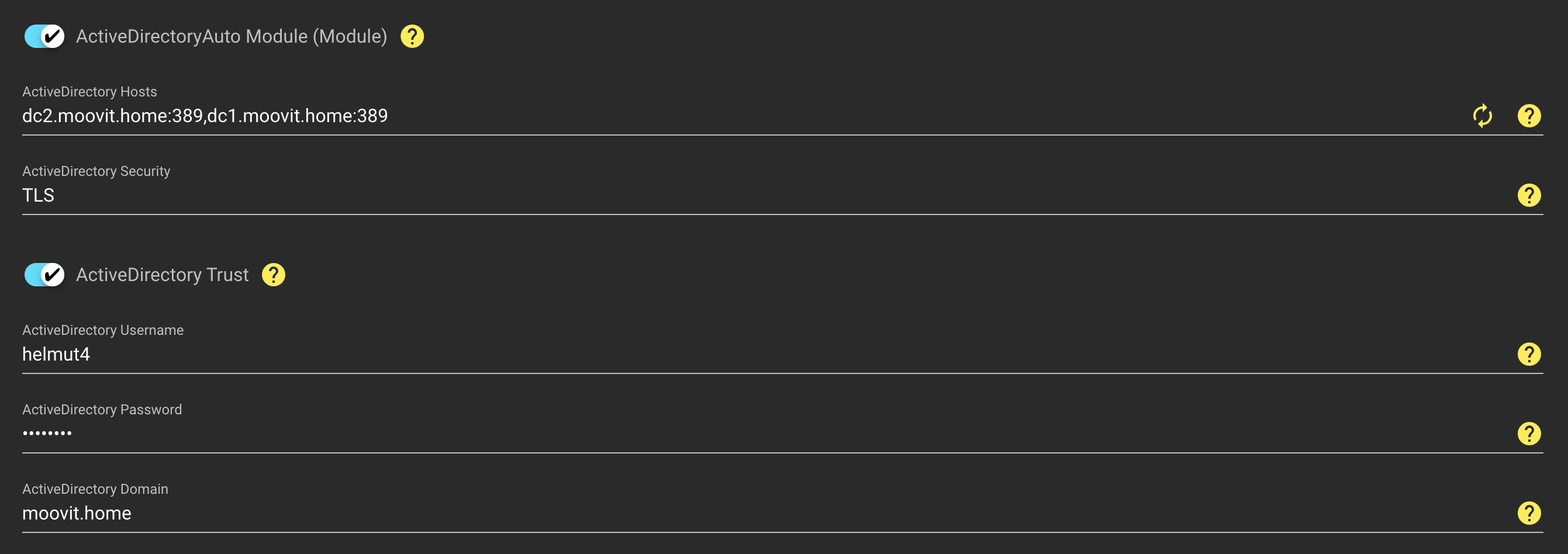
ActiveDirectory Auto Module 1/2
### Enable Switch
Enables/disables the module.
### ActiveDirectory Host
Hosts must be added here, separated by a comma. After setting the security method, the port will be added automatically to the dns/ip when clicking the yellow refresh button.
When using DNS please make sure, that the server does have a proper DNS configuration in place!
### ActiveDirectory Security
Dropdown to select the type of security: PLAIN (port 389), SSL (port 636), TLS (port 389)
### ActiveDirectory Domain
The domain must be added here if the active directory toggle switch is enabled.
### ActiveDirectory Password
The active directory password must be added here if the active directory toggle switch is enabled.
### ActiveDirectory Username
The active directory username must be added here if the active directory toggle switch is enabled.
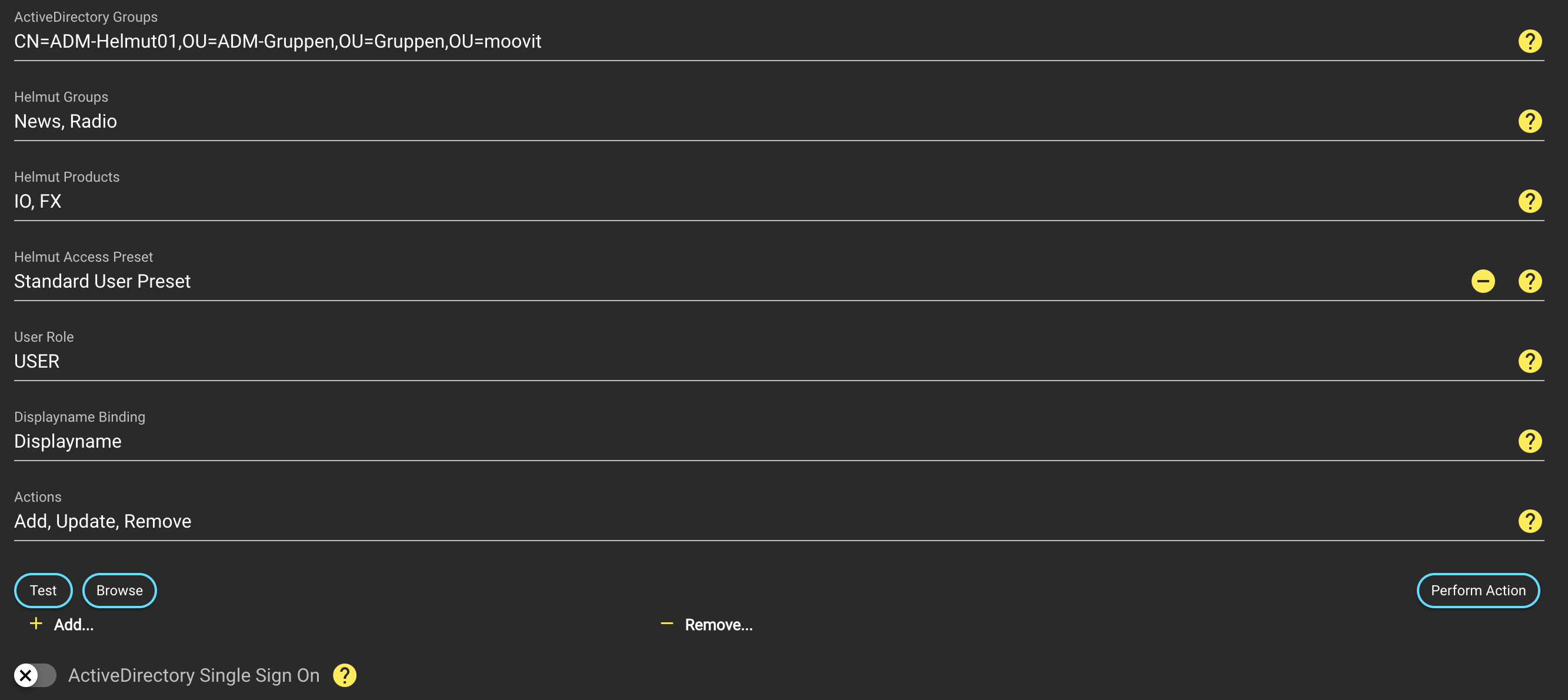
ActiveDirectory Auto Module 2/2
### **ActiveDirectory Groups**
Displays the group within the Active Directory that will be synchronised with the selected groups in Helmut.
### **Helmut Groups**
Dropdown to select one or multiple groups the synchronised users should be member of.
### **Helmut Products**
Dropdown to select the products to which the synchronised users should be granted access rights.
* FX
* IO
* CO
* HK
### **Helmut Access Preset**
Dropdown to select the [access preset](/helmut4-releases/v4.10.1/helmut4-components/helmutfx/users.md#access-presets) that the user should receive.
### User Role
Define the role of the user
* User
* Admin (will have full access to all groups / ignores access presets)
### Displayname Binding
Define how the user will be presented / show on top of the custom user actions
eg: moovit (username) - MoovIT Support (Displayusername) - (Email)
* Displayname
* Username
* Email
Displayname binding - username
### Actions
This defines the method which will be used when a synchronisation get triggered (manually or cron).
* ***Add***
* This method will import **only new** users, which have been added to the AD group.\
Existing helmut users will be added, so access for this group will be granted.\
\
Add might be wise to be triggerd on typical onboarding days like 1st, 2nd, 15th and 16th of every month.
* ***Update***
* This method will **update all existing users** within this group (which have already been imported into helmut) and set the rights according to the defined parameters: groups, products, preset, role and displayname binding\
\
Update might be wise to trigger on a weekly basis in case you are constantly updating your groups/access permissions.
* ***Remove***
* This method will **remove all users**, which aren't **part of the AD group anymore**.\
The user/profile won't be deleted, as the user might still be member of another group.\
\
Users which don't belong to any group, can be found in the [unassigned tab](/helmut4-releases/v4.10.1/helmut4-components/helmutfx/users.md#unassigned-tab) of the [users](/helmut4-releases/v4.10.1/helmut4-components/helmutfx/users.md) section.
### **Test Button**
The test button can be used to check whether and how many users are found.
### **Browse Button**
The Active Directory can be searched via the Browse button and the group to be synchronised can be selected.
### **Synchronize Button**
Synchronises the group.
### **Remove Group Button**
Removes the link between the AD group and the Helmut group
### **Add Group Button**
Adds another set of parameters to link another AD group with another Helmut group.
### **ActiveDirectory Single Sign On Switch**
Enables Single Sign On for the Active Directory. This only works for Windows OS.
### Importance during running AD sync
{% hint style="danger" %}
**Please pay attention on the AD sync parameters.**\
\
If you have added the same user to multiple AD groups (Action: Update), this will lead to multiple permission changes. At the end, the user will have the permission, which have been set in the last AD sync.\
\
The difference between Add vs Update is not trivial.\
\
Running "Add" will add new/existing users to a (new) group, not touching existing group access.\
\
Running "Update" will modify the rights, so all users will only be able to access the group(s), defined in this AD-helmut sync.
{% endhint %}