# Custom Metadata

## Overview

This page is about valid key-value pairs which can be used within Adobe Premiere Pro, After Effects and Media Encoder and synced to Cosmo.

{% hint style="info" %}
In general [Adobe is following](https://www.adobe.com/products/xmp.html) the default definition of allowed character for [xmp](https://www.loc.gov/standards/mets/mets-home.html).
{% endhint %}

## Usage Of Custom Metadata

Custom Metadata can be utilized to retrieve metadata values from assets in a project whenever it gets indexed.

{% hint style="warning" %}
The metadata won't be available to Cosmo as long as the project is currently in use or not indexed since the asset was added.
{% endhint %}

These asset metadata may originate from any other third-party system, such as a MAM or QC system, and do not necessarily need to exist or be created in the Helmut4 metadata.

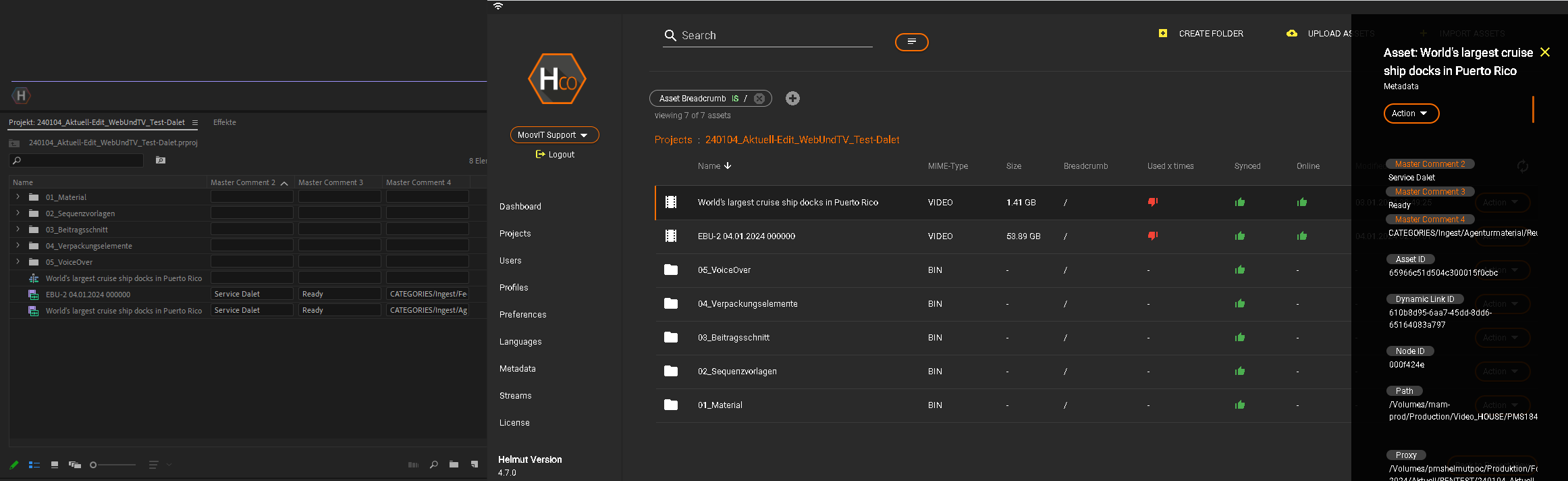
This metadata will be displayed in the Cosmo project view, reflecting the project state.

<figure><img src="https://content.gitbook.com/content/MDOObhR5m91Ea2DZ1Pfu/blobs/7aWoYwmphC7qC52NLcqN/Custom_Metadata.PNG" alt=""><figcaption><p>Premiere Pro - Cosmo Custom Metadata</p></figcaption></figure>

In the screenshot above, there are three asset metadata names: "Master Comment 2 to 4." These are added by the MAM system (in this case, Dalet Galaxy) and do not exist as Helmut metadata.

### Limitations Towards Custom Metadata

There are some disclaimers towards custom metadata.&#x20;

#### Job.Metadata Wildcard

Custom Metadata can't be accessed by using the [{job.metdata.?}](https://docs.helmut.de/helmut4-releases/v4.11.0/helmut4-components/streamdesigner/wildcards/job-related-wildcards-32/job-metadata) wildcard, as they haven't been created within Helmut4.

#### Availability Metadata

Custom metadata can only be viewed in Cosmo once the project is indexed via the [Cosmo Project File Index Action](https://docs.helmut.de/helmut4-releases/v4.11.0/helmut4-components/streamdesigner/nodes/actions/cosmo/cosmo-project-file-index-action).

### Interact with Custom Metadata

#### Read Custom Metadata Value

Custom Metadata can be retrieved only by using the [Cosmo Get Asset Metadata Action](https://docs.helmut.de/helmut4-releases/v4.11.0/helmut4-components/streamdesigner/nodes/actions/cosmo/cosmo-get-asset-metadata-action) only.

Navigate to the documentation of the node for further guidance.

#### Write / Update Custom Metadata Value

Custom Metadata can be changed only by using the [Cosmo Change Asset Metadata Action](https://docs.helmut.de/helmut4-releases/v4.11.0/helmut4-components/streamdesigner/nodes/actions/cosmo/cosmo-change-asset-metadata-action) only.

Navigate to the documentation of the node for further guidance.

## Key-Value Rulebook

### Key

* **Are** case-sensitive
* Can **not** start with a number
* Can **not** contain underscore (\_)

### Value

* **Are** case-sensitive
* **Can** start with a number, contain only numbers, or be a combination of numbers and letters
* **Can** contain underscores (\_)

#### Example for metadata key

Metadata key: "*key\_value pair"*\
\
This is **not** valid because there is a underscore in the key name. While values can contain spaces, keys can not.<br>

Metadata key: "*1story"*\
\
This is **not** valid because the key starts with a number which is forbidden.

## **Limitations / Disallowed Character**

There are some exceptions when using key-value, which are explained in the two following sections.

### **Disallowed characters in keys or values**

The following characters are reserved and not allowed in key names or values.

<table><thead><tr><th width="167">Character</th><th>not allowed in</th><th>Description</th></tr></thead><tbody><tr><td>"</td><td>Key</td><td>Double quotes</td></tr><tr><td>'</td><td>Key</td><td>Single quotes or apostrophe</td></tr><tr><td>=</td><td>Key/Value</td><td>Equal sign</td></tr><tr><td>!</td><td>Key</td><td>Exclamation point</td></tr><tr><td>+</td><td>Key</td><td>Plus sign</td></tr><tr><td>#</td><td>Key/Value</td><td>Pound or hash symbol</td></tr><tr><td>*</td><td>Key/Value</td><td>Asterisk</td></tr><tr><td>~</td><td>Key/Value</td><td>Tilde</td></tr><tr><td>;</td><td>Key/Value</td><td>Semicolon</td></tr><tr><td>^</td><td>Key/Value</td><td>Caret</td></tr><tr><td>()</td><td>Key/Value</td><td>Parentheses</td></tr><tr><td>&#x3C; ></td><td>Key/Value</td><td>Angle brackets</td></tr><tr><td>[ ]</td><td>Key/Value</td><td>Square brackets</td></tr><tr><td>,</td><td>Key/Value</td><td>Comma</td></tr><tr><td>&#x26;</td><td>Key/Value</td><td>Ampersand</td></tr><tr><td>|</td><td>Key/Value</td><td>Pipe</td></tr><tr><td>?</td><td>Key</td><td>Question mark</td></tr><tr><td>:</td><td>Key/Value</td><td>Double point</td></tr></tbody></table>

### Umlauts

As umlauts are often treated as special characters, those can cause issues when working on different operating systems as well with foreign language projects.

Within Helmut4 we have defined the most known and used umlauts in the European region to be proper detected & escaped when indexing a project.

| Lower case | Uper case | Description     |
| ---------- | --------- | --------------- |
| ä          | Ä         | German          |
| ö          | Ö         | German          |
| ü          | Ü         | German          |
| ß          | ẞ         | German          |
| æ          | Æ         | Northern Europe |
| ø          | Ø         | Northern Europe |
| å          | Å         | Northern Europe |
| -          | À         | Western Europe  |
| â          | Â         | Western Europe  |
| ç          | Ç         | Western Europe  |
| è          | È         | Western Europe  |
| é          | É         | Western Europe  |
| ê          | Ê         | Western Europe  |
| ë          | Ë         | Western Europe  |
| î          | Î         | Western Europe  |
| ô          | Ô         | Western Europe  |
| œ          | Œ         | Western Europe  |
| ù          | Ù         | Western Europe  |
| -          | Ÿ         | Western Europe  |
| ì          | -         | Western Europe  |
| ó          | -         | Western Europe  |
| ó          | -         | Western Europe  |
| õ          | -         | Western Europe  |
| ò          | -         | Western Europe  |
| ú          | -         | Western Europe  |
