> For the complete documentation index, see [llms.txt](https://docs.helmut.de/helmut4-releases/llms.txt). Markdown versions of documentation pages are available by appending `.md` to page URLs; this page is available as [Markdown](https://docs.helmut.de/helmut4-releases/v4.9.1/helmut4-components/streamdesigner/nodes/conditions/project-8/project-version-of-premiere-condition.md).
# Project Version of Premiere Condition
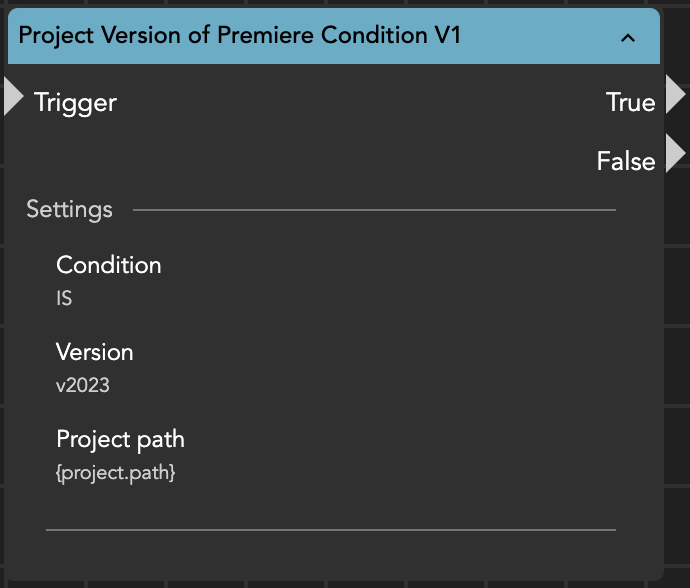
With the help of the Project Version of Premiere Condition it is possible to check the version of a certain Premiere project.\
The project version can be compared by providing the related „Project Path“ and a desired condition (e.g. IS\_OLDER) and exiting the node via true or false.
The node result will be the corresponding version number.
Example node result
*Source Premiere Pro project is 2022*
* Checking for version 2022
* Result: 40
* Node exit: true
* Checking for version 2023
* Result: Stream: Condition project premiere version IS 'v2023' (='41') not satisfied (actual: '40')
* Node exit: false
Project Version of Premiere Condition
#### Matching of Premiere version to version number:
| Premiere Version | Version number |
| ---------------- | -------------- |
| V2025 | 43 |
| V2024 | 42 |
| V2023 | 41 |
| V2022 | 40 |
| v2021 | 39 |
| v2020 | 38 |
| v2019\_1 | 37 |
| v2019 | 36 |
| v2018\_1 | 35 |
| v2018 | 34 |
| v2017\_1 | 33 |
| v2017 | 32 |
| v2015\_4 | 31 |
| v2015\_2 | 30 |
Before any manipulation of the project file is executed, a backup of the project file will be created with the extension '\*.prproj\_backup'. If the manipulation encounters an issue, such as creating a 0 KB project file, the backup file will be used to replace the corrupted file.