> For the complete documentation index, see [llms.txt](https://docs.helmut.de/helmut4-releases/llms.txt). Markdown versions of documentation pages are available by appending `.md` to page URLs; this page is available as [Markdown](https://docs.helmut.de/helmut4-releases/v4.12.0/helmut4-components/streamdesigner/nodes/actions/misc-21/http-request-action.md).
# HTTP Request Action
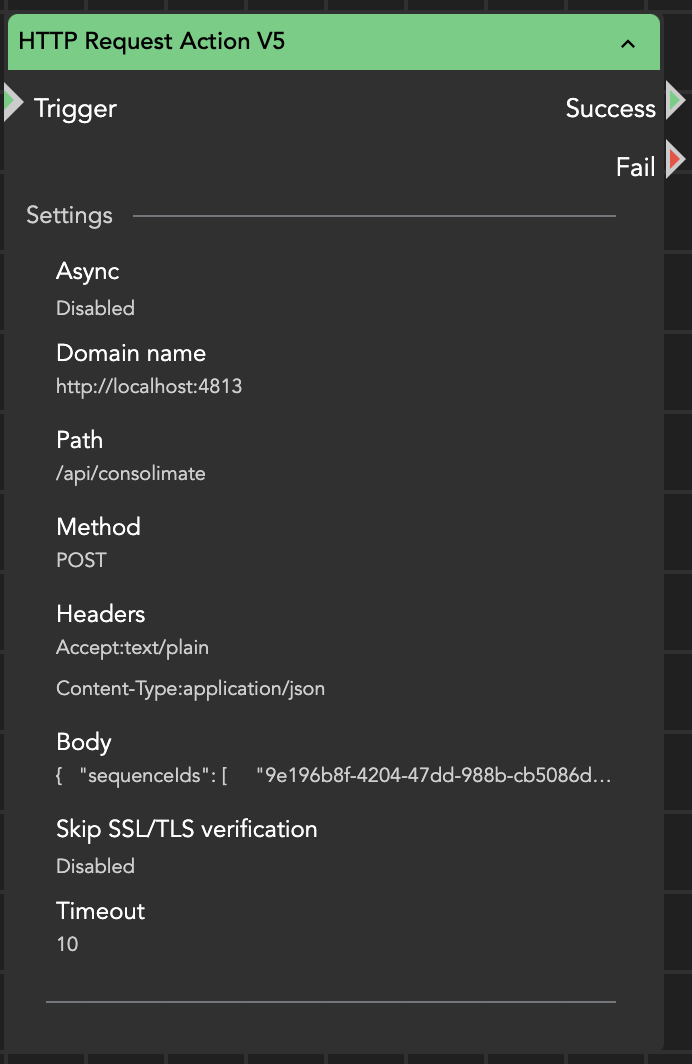
The **HTTP Request Action** node is the Swiss-Army knife for integrating Helmut with third-party REST APIs. It can send HTTP requests to any REST-based system and returns the full response (status code, headers, and body) to the stream for further processing.
#### Input Parameters
**Domain Name**\
Base URL (scheme + host, optionally port) of the target API.\
Example: `https://api.example.com` or `http://192.168.1.10:8080`
**Path**\
Endpoint path appended to the domain name.\
Example: `/v1/users`
**Method**\
HTTP verb to use: **GET**, **POST**, **PUT**, **PATCH**, **DELETE**
**Headers**\
Optional list of request headers in `Key:Value` format.\
Example: `Content-Type:application/json`
**Body**\
Optional request payload (typically JSON) for methods that support a body (POST/PUT/PATCH).
**Skip SSL/TLS Verification**\
If enabled, certificate validation is disabled for HTTPS requests (useful for self-signed certificates).
**Timeout**\
Maximum time (in seconds) to wait for a response.
**Async**\
Enables or disables asynchronous execution.
HTTP Request Action
#### Output and Wildcards
The node captures the complete response and makes it available via:
* [{node.result.?}](/helmut4-releases/v4.12.0/helmut4-components/streamdesigner/wildcards/result-or-return-wildcards-2/node-result.md)
* [{stream.last\_result}](/helmut4-releases/v4.12.0/helmut4-components/streamdesigner/wildcards/result-or-return-wildcards-2/stream-last_result.md)
The response object is structured into:
* `code` — HTTP status code (e.g., 200, 404, 500)
* `headers` — response headers
* `body` — response payload (parsed JSON when applicable)
This structure makes it easy to extract only what you need by using the [JSON Extract Action](/helmut4-releases/v4.12.0/helmut4-components/streamdesigner/nodes/actions/misc-21/json-related-nodes-2/json-extract-action.md) node.
#### Typical Use Cases
* creating or updating records in external systems (MAM, CMS, ticketing, etc.)
* triggering webhooks or automation endpoints
* fetching metadata for workflow decisions
* sending job or delivery status updates
* authenticating and retrieving session tokens
#### Example Response (simplified)
A successful request typically returns an object like:
* `code`: `200`
* `headers`: response header map
* `body`: JSON payload (e.g., user object, token, created resource)
#### Important Notes
* The **Headers** field must be formatted correctly (`Key:Value`). Incorrect formatting may cause the request to fail or be interpreted incorrectly.
* Use **Skip SSL/TLS Verification** only when necessary (e.g., internal endpoints with self-signed certs). Disabling verification reduces security.
* For long-running endpoints, increase the **Timeout** or move the call to an asynchronous workflow path (e.g., Split Stream).
#### Practical Tip
If you need to chain multiple API calls (login → token → next request), store the returned token from `body` and re-use it in the next node’s headers (e.g., `Authorization: Bearer `).
Example node output
```json
{
"code":200,
"headers":{
"Transfer-Encoding":[
"chunked"
],
"null":[
"HTTP/1.1 200 OK"
],
"Version":[
"4.10.0"
],
"Vary":[
"Access-Control-Request-Headers",
"Access-Control-Request-Method",
"Origin"
],
"Date":[
"Tue, 06 May 2025 11:51:02 GMT"
],
"Content-Type":[
"application/json"
]
},
"body":{
"id":"5e21ed926d44e10001fdd2e4",
"username":"admin",
"displayname":"admin",
"email":"admin",
"lastLogin":"2025-05-06T07:04:54.585Z",
"isConnected":false,
"isFlowUser":false,
"isRenderNode":false,
"isActiveDirectoryUser":false,
"isOktaUser":false,
"role":"ADMIN",
"os":"mac",
"hostname":"MacBook-Pro.local",
"clientVersion":"4.10.0.8",
"clientSessionToken":"1952e144-c358-46e9-af22-ca4a6f596a19",
"issuer":"http://192.18.122.20",
"failedLoginAttempts":0
}
}
```