# Check if ports are used by other apps
## Introduction
The helmut4 client requires two ports, to spin up, which are "8880" and "8881".
These ports are used for internal communication (localhost).
If another application is using this port during startup, the client won't be able to start and establish a connection. This state will be shown in the client log.
Occupied port 8881 during helmut4 client startup
## Windows
It is possible to determine, if there is an application using the port.
### Commandline
```batch
::: Find application, which is running on port "8881" - will list result for IPv4 + IPv6
for /f "tokens=5" %a in ('netstat -aon ^| find "8881"') do @tasklist | findstr %a
```
If there is an application running on that specific port, this will be the result.
You will see the process listed twice, once for IPv4 and once for IPv6. Both are using the same PIC (process ID), which will make this easy to recognice.
Application running on port #8881 - check via cmd
### Powershell
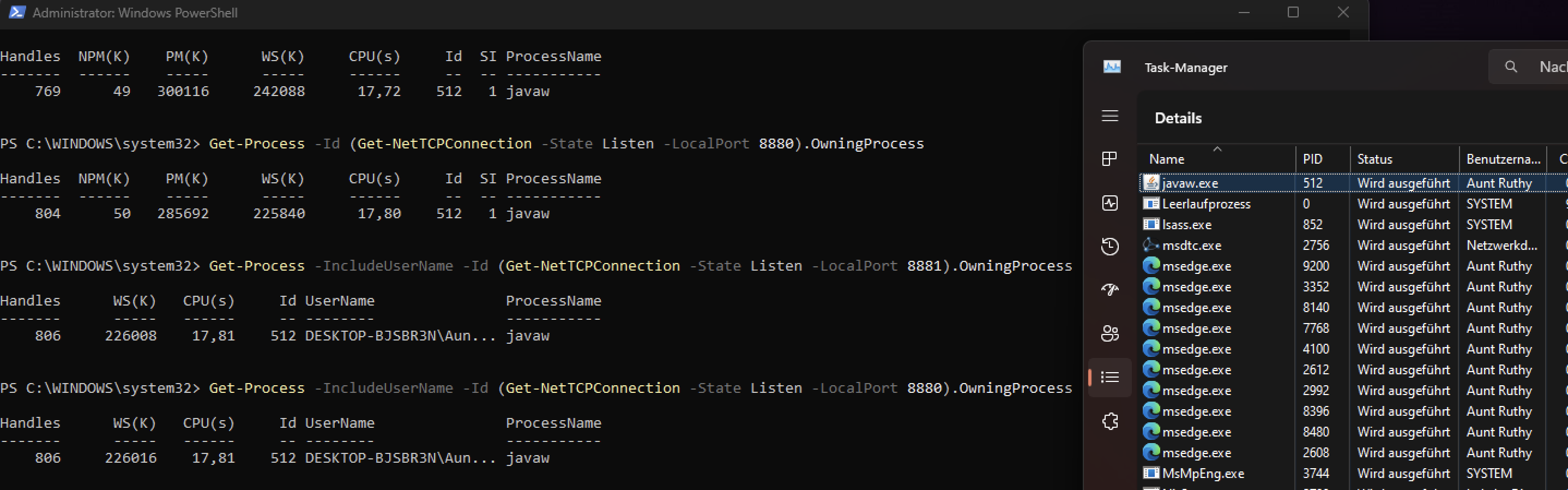
Alternatively you can run this powershell command as well, this will return only IPv4 results.
```powershell
# Without admin rights for Port 8880 and 8881
Get-Process -Id (Get-NetTCPConnection -State Listen -LocalPort 8881).OwningProcess
Get-Process -Id (Get-NetTCPConnection -State Listen -LocalPort 8880).OwningProcess
# With admin rights (run as administrator) to get also the username for port 8880 and port 8881
Get-Process -IncludeUserName -Id (Get-NetTCPConnection -State Listen -LocalPort 8881).OwningProcess
Get-Process -IncludeUserName -Id (Get-NetTCPConnection -State Listen -LocalPort 8880).OwningProcess
```
The ID in the powershell return is referring to the process in the task manager with the same PID.
Application running on port #8880 / 8881 - check via powershell
## Macintosh
On a mac, the method is similar but more easier to find the application name
```bash
# Find application, which is running on port "8881"
lsof -i :8881
```
If there is an application running on that specific port, this will be the result (IPv4/IPv6)