> For the complete documentation index, see [llms.txt](https://docs.helmut.de/helmut4-releases/llms.txt). Markdown versions of documentation pages are available by appending `.md` to page URLs; this page is available as [Markdown](https://docs.helmut.de/helmut4-releases/v4.12.0/helmut4-components/streamdesigner/nodes/actions/cosmo-16/cosmo-get-asset-metadata-action.md).
# Cosmo Get Asset Metadata Action
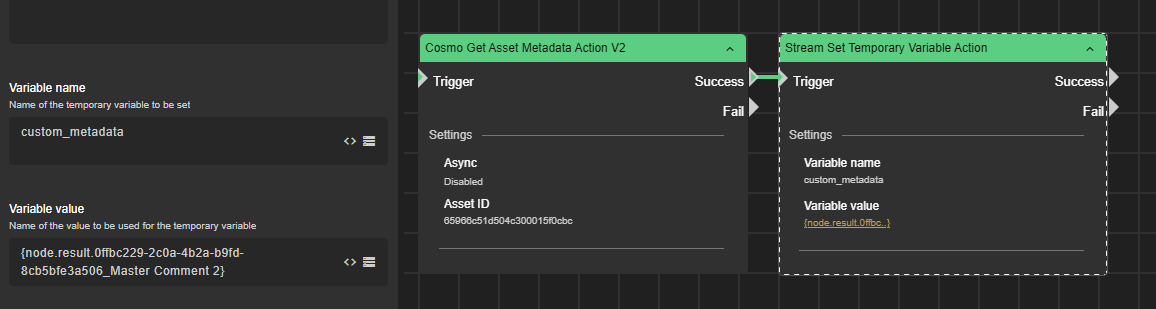
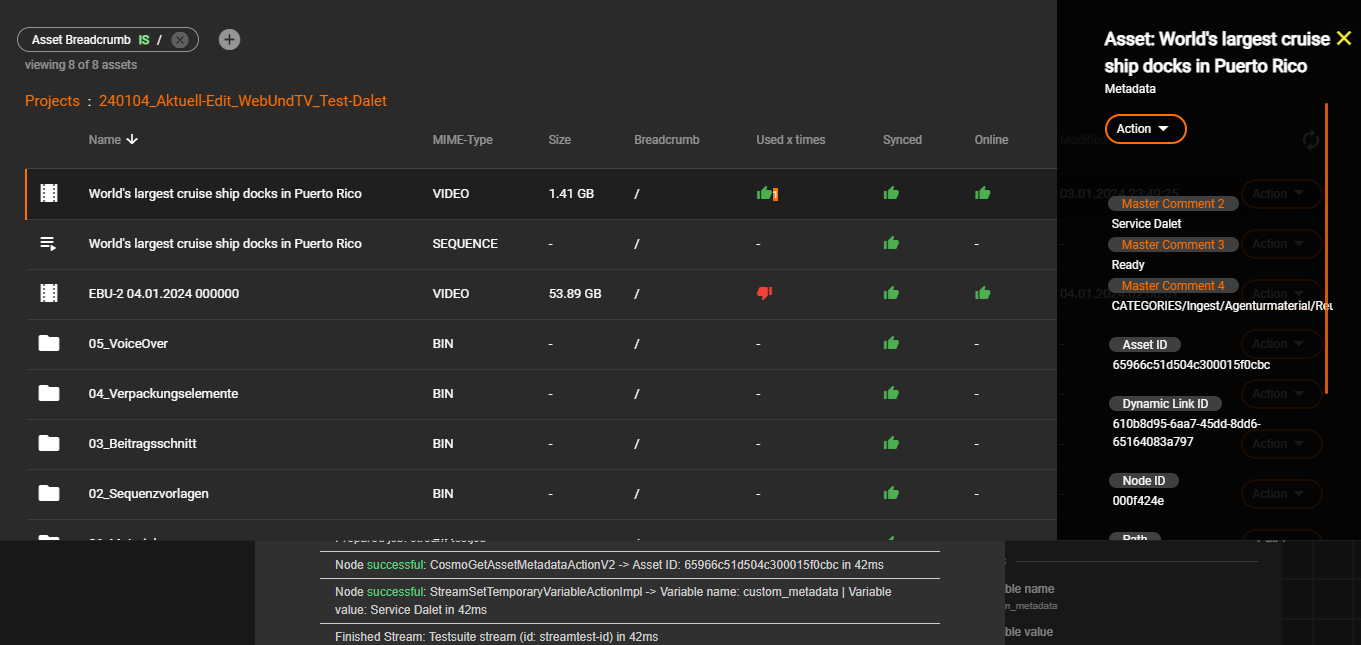
The **Cosmo Get Asset Metadata Action** node retrieves custom metadata from an asset stored in Cosmo and makes the values available to the stream via the node result wildcard.
The metadata can then be used by subsequent nodes for conditional logic, automation decisions, or reporting workflows.
The node requires an existing asset in Cosmo and the corresponding [**Asset ID**](/helmut4-releases/v4.12.0/helmut4-components/streamdesigner/wildcards/job-related-wildcards-32/job-assetid.md).
#### Output and Wildcard Usage
All retrieved metadata values are written to the node result and can be accessed using:
[{node.result.?}](/helmut4-releases/v4.12.0/helmut4-components/streamdesigner/wildcards/result-or-return-wildcards-2/node-result.md)
Each metadata entry is stored using the following naming pattern:
`nodeID_metadataKey`
Example:\
`d7d99d44-07a1-40f8-8053-3db89482342c_metaKey`
Special characters `{ }` and `%` are not supported within metadata keys.
#### Example
Assume an asset has:
* Asset ID: `6225d94587a52b082de53896`
* Metadata key: `type`
* Metadata value: `VIDEO`
After executing the node (with the asset ID provided), and assuming the node ID is:
`d7d99d44-07a1-40f8-8053-3db89482342c`
the metadata value can be retrieved in the stream using:
`{node.result.d7d99d44-07a1-40f8-8053-3db89482342c_type}`
This expression will resolve to:
`VIDEO`
#### Input Parameters
**Asset ID**\
Database ID of the asset whose metadata should be requested.\
Typically retrieved via [{job.assetId}](/helmut4-releases/v4.12.0/helmut4-components/streamdesigner/wildcards/job-related-wildcards-32/job-assetid.md).
{% hint style="info" %}
#### Important Timing Note
Avoid executing this node immediately after [Cosmo Add Asset to Project Action](/helmut4-releases/v4.12.0/helmut4-components/streamdesigner/nodes/actions/cosmo-16/cosmo-add-asset-to-project-action.md).\
The asset may not yet be fully available in the database. If both nodes are used in the same stream, insert a [Sleep node](/helmut4-releases/v4.12.0/helmut4-components/streamdesigner/nodes/actions/misc-21/sleep-action.md) between them (recommended delay: **at least 4000 ms**).
{% endhint %}
#### Behavior
* Reads custom metadata from the Cosmo database
* Does not modify the asset
* Makes metadata available to following nodes
* Supports asynchronous execution
The node fails if the asset does not exist or if no metadata is available.
#### Typical Use Cases
* workflow branching (e.g., based on asset type)
* automated publishing decisions
* QC-based automation
* conditional transcoding
* integration with external systems
In simple terms:\
This node lets your workflow *react* to metadata.\
Instead of hardcoding behavior, the stream can dynamically decide what to do depending on information attached to the asset.