> For the complete documentation index, see [llms.txt](https://docs.helmut.de/helmut4-releases/llms.txt). Markdown versions of documentation pages are available by appending `.md` to page URLs; this page is available as [Markdown](https://docs.helmut.de/helmut4-releases/helmut4-components/streamdesigner/nodes/actions/third-party/moovit-msp/helmut.cloud-2/job-helmut-cloud-execute-stream-action.md).
# Job Helmut Cloud Execute Stream Action
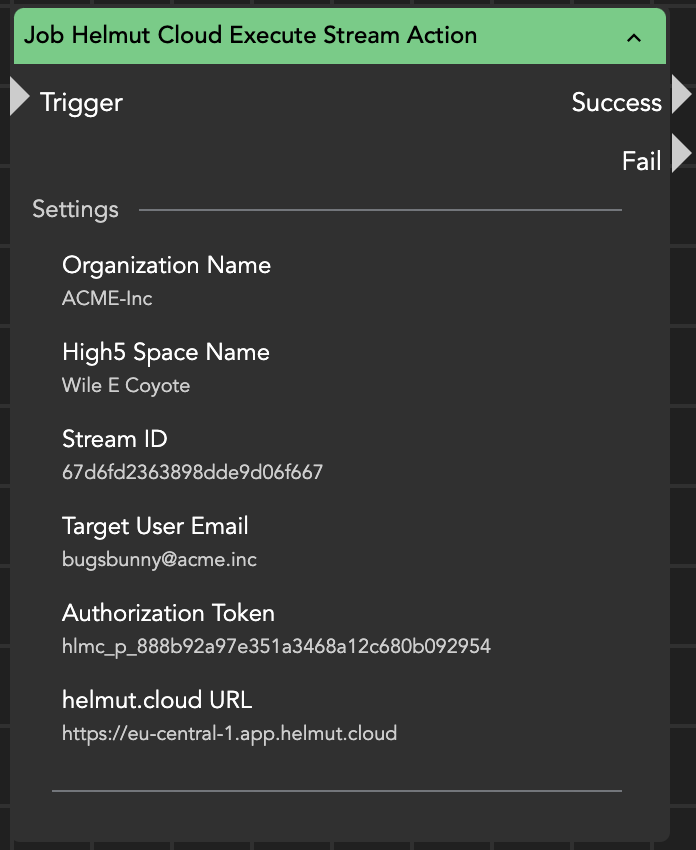
The Job Helmut Cloud Execute Stream Action node lets you execute a [helmut.cloud](https://www.helmut.cloud/) stream created within [High5](https://www.helmut.cloud/high5/). It requires several parameters for proper execution:
* **Organization Name:** The name of your organization
* **High5 Space Name:** The name of the High5 space
* **Stream ID:** The identifier of the desired stream
* **Target User Email:** The email address of the helmut.cloud [agent](https://www.helmut.cloud/agent/) (user) who should execute the stream
* **Authorization Token:** The Personal Access Token (PAT) from helmut.cloud. Refer to the [helmut.cloud documentation](https://docs.helmut.cloud/personal-account/account-settings/security#personal-access-token-pat) for instructions on obtaining this token
* **helmut.cloud URL:** The URL of the dedicated helmut.cloud region (e.g., eu-central-1, us-east-1)
{% hint style="info" %}
Some of this information can also be extracted directly from the example stream URL below:\
\
[**https://app.helmut.cloud**](#user-content-fn-1)[^1]/high5/designer/#/org/[**Acme-Inc**](#user-content-fn-2)[^2]/spaces/[**Wile-E-Coyote**](#user-content-fn-3)[^3]/events/h4/streams/[**67d6fd2363898dde9d06f667**](#user-content-fn-4)[^4]
{% endhint %}
Job Helmut Cloud Execute Stream Action
The node returns the payload of the job using the [{stream.last\_result}](/helmut4-releases/helmut4-components/streamdesigner/wildcards/result-or-return-wildcards-2/stream-last_result.md) or [{node.result.?}](/helmut4-releases/helmut4-components/streamdesigner/wildcards/result-or-return-wildcards-2/node-result.md) wildcard, which contains the execution, status and log ID.
```json
{
"high5ExecutionId":"67f6741f0ba5d5b7d3abc74c",
"statusId":"67c6731f0ca5h3b7d3abc752",
"logId":"67a6731f1ca5d5b7s3abc74f"
}
```
{% hint style="warning" %}
The node also returns helpful information if the execution failed:
Given space not found
Organization not found
Failed to validate 'path' parameter 'streamId' - Invalid Mongo ID
Requested target is not a member of the organization
Your authentication token is invalid
The personal access token used for authentication has expired
{% endhint %}
[^1]: helmut.cloud URL
[^2]: Organization Name
[^3]: High5 Space Name
[^4]: Stream ID