> For the complete documentation index, see [llms.txt](https://docs.helmut.de/helmut4-releases/llms.txt). Markdown versions of documentation pages are available by appending `.md` to page URLs; this page is available as [Markdown](https://docs.helmut.de/helmut4-releases/helmut4-components/streamdesigner/wildcards/variable-related-wildcards-3/stream-variable.md).
# Stream Variable ?
This wildcard is replaced with the value of a previously set, temporary variable. These temporary variables must be set within the stream and are only available while the stream is running.
{% hint style="info" %}
Temporary variable exist only in the current, running stream.
\
Although it is possible to forward them to another stream via [Job Create Job Action](/helmut4-releases/helmut4-components/streamdesigner/nodes/actions/job-action/job-create-job-action.md) or [Stream Execute Generic Stream Action](/helmut4-releases/helmut4-components/streamdesigner/nodes/actions/misc-21/stream-execute-generic-stream-action.md).\
\
In case the following stream is setting a temporary variable with the same name, the previous one will be overwritten!
{% endhint %}
### Use of the wildcard
The wildcard is used in the following ways:
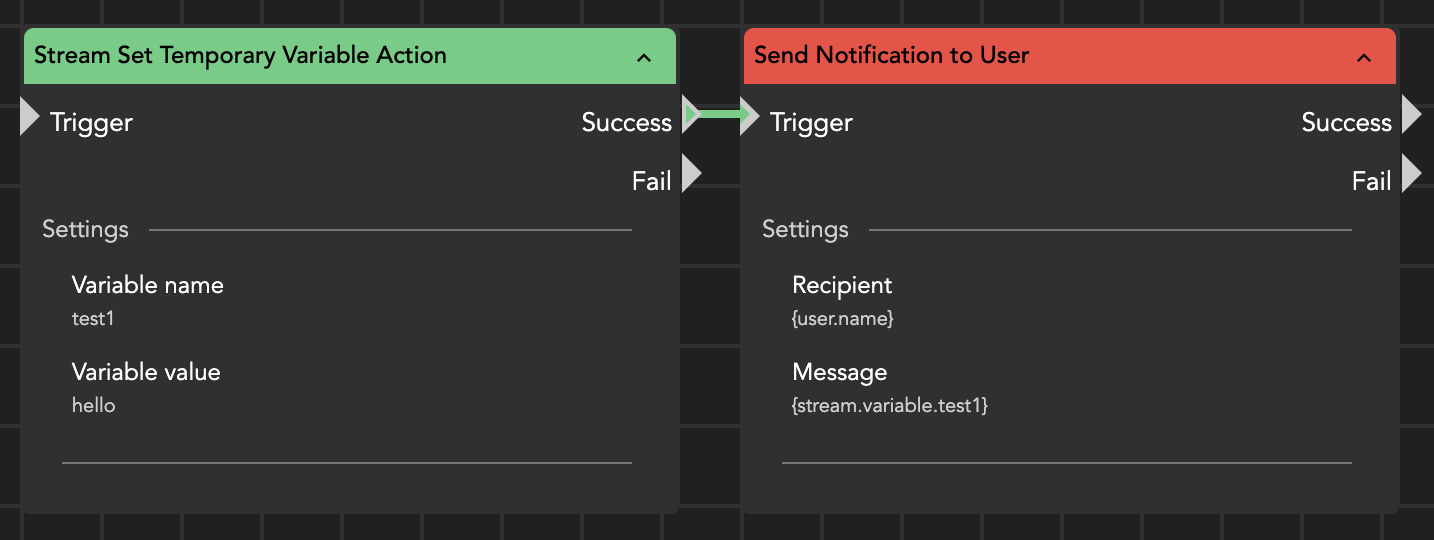
* Variable name: test1
* Variable value: hello
* {stream.variable.?}
* For the following input (?) --> test1
* {stream.variable.test1}
* The output is going to be --> hello